 Admin
Admin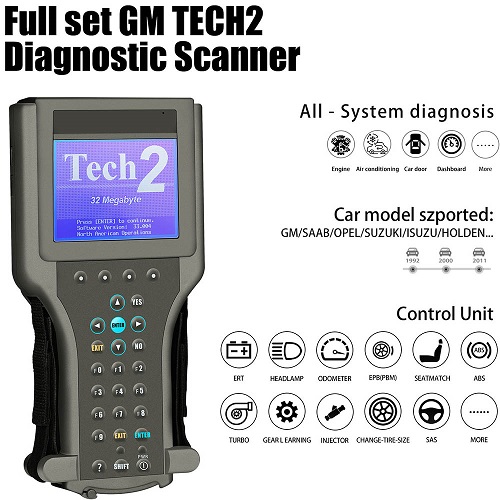
Understanding the Role of GM TECH2 in Modern Diagnostics
The automotive industry has evolved into a highly electronic and software-driven ecosystem, and tools like GM TECH2 have become essential for accurate vehicle diagnostics. GM TECH2 is a professional-grade scan tool designed specifically for General Motors vehicles, enabling technicians and advanced users to access vehicle data, diagnose faults, and perform critical system functions. Whether working on engine control modules, transmission systems, or body electronics, GM TECH2 provides deep-level access that basic scanners cannot match.
One of the main reasons GM TECH2 remains relevant even today is its reliability and compatibility with a wide range of GM vehicles. From older models to more complex systems, GM TECH2 continues to be a trusted diagnostic companion in workshops around the world. Understanding how to use GM TECH2 effectively can significantly improve diagnostic accuracy and reduce repair time.
Getting Started with GM TECH2 Setup and Configuration
Before diving into diagnostics, it is important to properly set up GM TECH2. A correct setup ensures accurate readings and prevents miscommunication between the tool and the vehicle’s onboard systems. GM TECH2 typically comes with a handheld unit, diagnostic cartridges or software, a vehicle communication interface, and connecting cables.
To begin using GM TECH2, ensure the device is fully updated and compatible with the vehicle you are working on. Proper configuration includes selecting the correct vehicle model, year, and system type. This allows GM TECH2 to communicate effectively with the onboard diagnostic modules.
Technicians should also ensure that battery voltage is stable during diagnostics, as fluctuations can affect GM TECH2 readings. A fully charged vehicle battery or a power support unit is recommended for consistent performance.
Navigating Core Features of GM TECH2
GM TECH2 offers a wide range of diagnostic functions that make it a powerful tool in automotive troubleshooting. Some of the core features include reading and clearing diagnostic trouble codes (DTCs), viewing live data streams, performing bi-directional control tests, and accessing ECU programming functions.
One of the most valuable features of GM TECH2 is its ability to perform live data monitoring. This allows users to observe real-time performance metrics such as engine temperature, fuel trim, sensor outputs, and transmission behavior. By analyzing this data, technicians can identify irregular patterns that may not trigger immediate fault codes.
Another important capability of GM TECH2 is module programming and configuration. This function is particularly useful when replacing control modules or updating system settings. GM TECH2 ensures that new components are correctly integrated into the vehicle’s electronic system.
Advanced Diagnostic Techniques Using GM TECH2
Once users are familiar with the basic functions of GM TECH2, they can move on to advanced diagnostic techniques. These techniques involve deeper system analysis and require a strong understanding of vehicle electronics.
One advanced method is performing bi-directional control tests using GM TECH2. This allows technicians to activate or deactivate components such as fuel pumps, cooling fans, and injectors directly from the tool. By doing so, users can verify whether specific components are functioning correctly without disassembling the vehicle.
Another advanced use of GM TECH2 is system recalibration. After repairs or part replacements, certain systems such as throttle bodies, transmission modules, or steering angle sensors may require recalibration. GM TECH2 provides guided procedures to ensure accurate system alignment.
Additionally, GM TECH2 can be used for security and immobilizer functions in some GM vehicles. This includes key programming and anti-theft system configuration, which are essential in modern automotive security systems.
Troubleshooting Common Issues with GM TECH2
Although GM TECH2 is a highly reliable tool, users may occasionally encounter issues during operation. Understanding how to troubleshoot these problems is essential for smooth workflow.
One common issue is communication failure between GM TECH2 and the vehicle. This is often caused by loose cables, incorrect vehicle selection, or low battery voltage. Ensuring proper connections and stable power usually resolves the issue.
Another challenge users may face is outdated software. Since vehicle systems evolve over time, using an updated version of GM TECH2 software is critical for compatibility. Regular updates ensure access to the latest diagnostic protocols.
In some cases, GM TECH2 may display inaccurate readings due to faulty sensors in the vehicle rather than the tool itself. In such situations, cross-verifying data with manual testing methods is recommended.
Best Practices for Maximizing GM TECH2 Performance
To get the most out of GM TECH2, users should follow certain best practices that enhance both accuracy and efficiency. First, always perform a system scan before and after repairs. This ensures that all issues are identified and resolved properly.
Second, keep the GM TECH2 device updated regularly. Software updates not only improve compatibility but also enhance diagnostic functions and fix known bugs.
Third, maintain proper handling and storage of GM TECH2. Since it is a sensitive electronic device, exposure to extreme temperatures or physical damage can affect performance.
Another best practice is to document all diagnostic results. Keeping records of GM TECH2 scans helps track recurring issues and provides valuable insights for future repairs.
Benefits of Using GM TECH2 in Professional Diagnostics
The use of GM TECH2 offers several benefits for automotive professionals and advanced users. One of the biggest advantages is diagnostic accuracy. With GM TECH2, technicians can pinpoint issues more precisely, reducing guesswork and unnecessary part replacements.
Another benefit is time efficiency. GM TECH2 allows quick access to vehicle systems, significantly reducing diagnostic time compared to manual troubleshooting methods. This leads to faster repairs and improved customer satisfaction.
GM TECH2 also enhances versatility. It supports a wide range of GM vehicles and systems, making it a valuable tool in multi-vehicle workshops. From engine diagnostics to electronic system configuration, GM TECH2 covers nearly every aspect of vehicle analysis.
Future Relevance of GM TECH2 in Automotive Technology
Although newer diagnostic tools continue to emerge, GM TECH2 still holds importance in the automotive industry. Many workshops continue to rely on GM TECH2 due to its proven reliability and extensive compatibility with older GM models.
As vehicles become more advanced, tools like GM TECH2 may evolve or integrate with newer platforms, but the core principles of diagnostics remain the same. Understanding GM TECH2 provides a strong foundation for working with modern diagnostic systems.
Conclusion
Mastering GM TECH2 requires a combination of technical knowledge, hands-on practice, and attention to detail. From basic setup to advanced diagnostics, GM TECH2 offers powerful features that enable accurate vehicle analysis and efficient repairs. By following best practices and continuously improving diagnostic skills, technicians can fully leverage the capabilities of GM TECH2 and enhance their overall performance in automotive diagnostics.
